Income Expense Log Book: Avoid Costly Mistakes When Publishing on Amazon KDP
The Income Expense Log Book has become a staple for anyone who wants to track finances in a structured, tactile way. Whether you are a freelancer separating business and personal costs, a small business owner needing a simple ledger, or a customer looking for a thoughtful budgeting gift, these books sell consistently. For creators and entrepreneurs, publishing a log book on Amazon Kindle Direct Publishing (KDP) offers a low-content book opportunity with steady demand. But uploading a file that meets KDP’s technical specifications is not as simple as exporting a document. Many first-time publishers watch their formatted interior get rejected or, worse, receive poor reviews because of hard-to-use layouts.
The real problem isn’t the idea; it’s the overlooked details in the file preparation process. A blurry page, mismatched margins, or a PDF that fails Amazon’s checks can delay your launch by weeks. This article focuses on practical, solution-driven advice to help you choose and use a ready-to-upload Income Expense Log Book interior without frustration. You will learn which file types actually work, what “KDP tested” means, and why small print-production terms like “no bleed” can make or break your book. By recognizing a few common mistakes now, you can publish a professional-looking log book that customers trust and reorder.
Why People Choose a Pre-Made Income Expense Log Book Interior
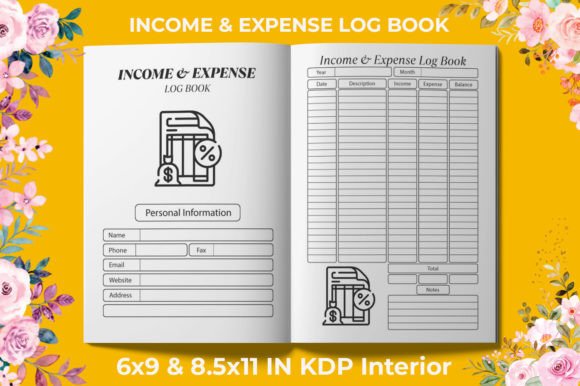
Designing a 120-page log book from scratch takes hours if you count column alignment, consistent header placement, and margin trimming. Many publishers turn to a ready-made Income Expense Log Book file to bypass that learning curve. These interiors come with pre-arranged date fields, description columns, income and expense categories, and running balance lines—everything formatted to fit a standard trim size. Instead of wrestling with design software, you download the file, verify the setup, and upload it directly to your KDP account. The goal is speed without sacrificing quality, provided that the source file was built correctly.
Common Mistakes When Buying and Using KDP Log Book Files
Even experienced publishers make errors that are entirely avoidable. Understanding these pitfalls early keeps your project timeline intact and prevents that sinking feeling of a “Manuscript Not Supported” email.
1. Ignoring the Difference Between a Standard PDF and a KDP-Ready PDF
A regular PDF might look perfect on your screen but fail Amazon’s print specifications. KDP requires specific settings for trim size, margins, and color space. When a seller offers a 120-page PDF and the supplementary .jpg files, always confirm the PDF was exported for print, not web. Screen-optimized PDFs often compress images too aggressively, causing a loss of sharpness in the final book. You receive a soft, slightly fuzzy interior that customers notice. Look for terms like 300 DPI and high-resolution interiors in the product description. These indicate the graphics and lines were built for physical printing. If the product listing doesn’t mention resolution or KDP compatibility, ask the seller before purchasing. Better yet, choose a file explicitly labeled KDP tested. That testing process usually means someone already uploaded the exact file, ordered a proof copy, and verified no trimming or color errors occurred.
2. Overlooking Bleed Settings for Your Page Design
Bleed is the extra printed area that extends past the trim edge, allowing artwork or background color to run to the edge of the page. Not every log book needs bleed. In fact, most ledger-style books work better without it because they contain only black text and thin lines on white paper. The product highlighted here specifies No Bleed for good reason. When you upload a no-bleed interior, you avoid that awkward white sliver that appears if KDP trims slightly off center. For an income and expense tracker, clean borders and ample margin space are essential for comfortable writing. If you mistakenly set your KDP title to “bleed” when the interior was designed for no bleed, Amazon will scale pages unpredictably, potentially cutting off headers or footers. Always match the bleed setting in your KDP dashboard to the file’s original design intent. If you purchased a no bleed file, do not check the “bleed” box during setup.
3. Choosing the Wrong Trim Size Without Checking the File List
Reputable sellers bundle multiple size options so you can target different customer preferences. A compact 6×9 inch book fits easily in a bag and feels like a personal diary, ideal for freelancers and individuals. An 8.5×11 inch version provides the spacious desktop format that business owners appreciate for detailed entries. The error occurs when a buyer downloads only one file thinking all sizes are inside, then uploads the wrong one to a listing. Suddenly, 8.5×11 content is squeezed onto a 6×9 page, or vice versa, creating tiny text or cut-off tables. Before uploading, open the PDF and check the document properties. Verify the dimensions match exactly what you set in your KDP title details. A package that includes “2 PDF” files and “jpg” files likely gives you both sizes. Rename the files clearly on your computer immediately after downloading so you never mix them up later.
4. Assuming Every JPG Will Work as a Print-Ready Book Page
Single JPG pages can be useful for previews, social media posts, or creating a spiral-bound version through another service. But for a KDP paperback, a well-structured PDF is mandatory. Some publishers attempt to assemble a PDF from individual JPGs using conversion software, and that process often strips out the precise resolution or introduces compression artifacts. The .jpg files included in this kind of product serve as a flexible bonus—you might use them to let a designer make small customizations—but they are not a replacement for the high-resolution PDF when uploading to Amazon. If you do need to modify a page, edit the JPG at the original 300 DPI, then re-embed it into a fresh PDF using a layout program. Never resave a compressed screenshot. Always preserve the original pixel data to keep the crisp, high-resolution interiors that the product promises.
5. Neglecting the Customer’s Writing Experience in the Layout
Even a technically flawless file can flop if it ignores the human hand. A common design oversight is cramming too many rows onto one page, leaving barely enough height for a pencil line. When you review a pre-made Income Expense Log Book, check the line spacing and margin width. The 120 pages should feel generous, not crowded. The left margin near the binding edge must be wider than the outer margin so that when someone opens the book flat, text doesn’t disappear into the crease. KDP’s “no bleed” format already pushes content inward a bit, but good interior design accounts for that extra gutter space. If the file you purchased doesn’t have at least 0.75 inches of inner margin, request a revision or choose another product. A buyer who struggles to write will leave a negative review even if the book looks beautiful on screen.
What to Check Before You Upload to KDP
Before logging into your KDP account, run through a short checklist. First, open the final PDF at 100% zoom and scroll through several pages. Check for pixelation on the number columns or header text. A 300 DPI file will remain sharp at full size. Next, confirm the page count matches your listing; if you bought a 120-page PDF, your paperback should list exactly 120 pages (plus any blank front or back matter you add). Mismatched page counts cause returns. Finally, use Amazon’s online previewer to simulate the printed page. Look at the edges: no text should lie within the danger zone near the trim. The “no bleed” design reduces that risk, but always verify because different printers have slight variance.
Building a Sustainable Publishing Habit
Once you upload a ready-to-upload interior on Amazon KDP and see a proof copy in your hands, you’ll appreciate why tested files save time. The same principles apply to any log book or planner you create or resell. Stick with formats that have been KDP tested, clearly labeled dimensions, and a resolution guarantee. Avoid the temptation to tweak a file just to make it look “different” unless you re-export it correctly. Many sellers of these digital products update their files based on KDP’s evolving requirements, so hold onto the original download link and check back for updates occasionally.
If you are new to publishing on Amazon, starting with a proven Income Expense Log Book interior gives you a reliable foundation. You can focus on cover design, keyword selection, and customer service while the internal layout does the heavy lifting. The store description mentions having more KDP products, and that is worth exploring after your first title is live. Consistent, high-quality interiors lead to repeat customers who come back for different log book types, whether it’s mileage, inventory, or general accounting.
Take the time to choose the right file format, respect the intended trim size, and always check for bleed settings. A little caution now prevents the frustration of a rejected upload or a disappointing author copy. The result is a physical book that helps people manage their income and expenses clearly—and a publishing experience you can repeat with confidence.