How Cornell Note Taking Paper Fits into Real Study Sessions, Meetings, and Everyday Thinking
You might have seen the classic layout: a page divided into a narrow left column, a wider right area, and a strip at the bottom. That’s Cornell Note Taking Paper—a deceptively simple tool that quietly reshapes the way people capture, process, and remember information. Instead of dumping raw sentences onto a blank sheet, the format nudges you into a cycle of note-taking, questioning, and summarizing that works across wildly different situations.
In practice, this paper feels less like stationery and more like a quiet workflow partner. A student underlining key terms during a biology lecture, a project manager scribbling action items from a client call, a language learner mapping new vocabulary—each ends up with notes that are built for review, not just storage. The magic isn't in the lines themselves; it's in the mental rhythm they encourage.
What Makes Cornell Note Taking Paper Different from a Regular Notebook
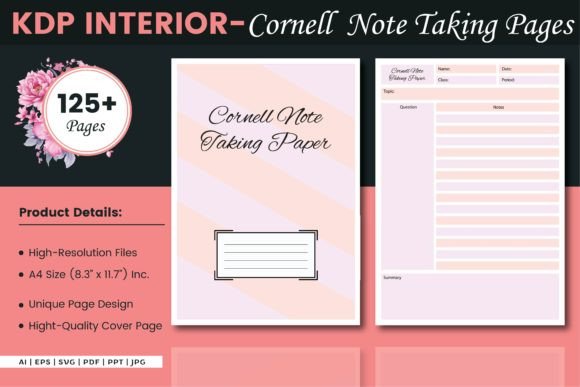
At first glance, the layout seems rigid. The right-hand column, the largest section, is where you record raw ideas, observations, or lecture points. The left column is reserved for cues—questions, keywords, or prompts that summarize the adjacent notes. The bottom summary area forces a brief synthesis of the entire page. This structure transforms passive note-taking into active engagement.
When you use standard ruled paper, it’s easy to write everything down and walk away. With Cornell Note Taking Paper, you’re constantly interacting: “What question does this fact answer?” or “How would I test myself on this concept later?” That shift alone explains why so many study skills courses, university learning centers, and professional development workshops recommend the format—not as a trend, but as a durable practice.
Where the Paper Shines Beyond the Classroom
While the Cornell method is rooted in academic success, its real-world applications extend far beyond lecture halls. The same layout that helps a medical student memorize physiology terms also helps a designer capture client feedback and turn it into actionable revisions.
Remote and Hybrid Workers Relying on Clear Meeting Notes
Video calls generate a flood of verbal information. Without structure, meeting notes become a jumble of partial sentences. A professional using Cornell Note Taking Paper can jot down discussion points on the right, then during a quiet moment transform the left column into a task list: “Follow up on budget,” “Clarify timeline with engineering.” The bottom summary becomes a one-sentence takeaway to share with the team. This turns a passive transcript into a decision-making document.
Language Learners Building Active Recall into Vocabulary Practice
Memorizing words without context rarely sticks. With the Cornell layout, a learner writes a new phrase and an example sentence on the right. The left column holds the native-language meaning or a picture prompt. Later, covering the right side and using only the cue triggers active recall—one of the most effective memory techniques. The bottom summary cements the usage scenario, like “Phrases for ordering coffee politely.” Suddenly, a page of paper becomes a self-quizzing tool.
Researchers and Analysts Taming Dense Material
Reading white papers, academic journals, or market reports can feel overwhelming. Cornell Note Taking Paper helps distill complexity. Raw data and citations go into the notes column. Cues become “Arguments for/against,” “Methodology limitations,” or “Relevance to my project.” The summary forces a concise synthesis, making it easier to write a literature review or present findings without flipping back through stacks of paper.
Creatives Organizing Inspiration Without Killing Spontaneity
Writers, artists, and content creators often resist structured formats, fearing they’ll stifle flow. Yet many find the Cornell layout liberating. During a brainstorming session, free-form ideas fill the right side without censorship. Later, cues transform into headline ideas, emotional hooks, or visual metaphors. The summary becomes a project brief or a one-sentence pitch. The paper doesn’t restrict creativity; it channels it into something usable later.
Personal Journaling That Actually Leads to Insight
For those who journal but rarely revisit entries, the Cornell format adds a reflective layer. After writing about an experience in the notes section, you can pull out cues like “What triggered this feeling?” or “Pattern I noticed.” The summary becomes a short insight or a next step. Over time, this creates a self-coaching dialogue that a traditional diary page rarely supports.
Why Different Audiences Gravitate Toward the Format
There’s no single “right” user for Cornell Note Taking Paper, which is part of its charm. High school students appreciate the clarity it brings to exam prep. Graduate researchers value the way it connects evidence to interpretation. Entrepreneurs and small business owners use it to map out decisions: notes on potential suppliers on the right, pros and cons in the cue column, a financial projection in the summary. Even parents helping kids with homework find the structure reduces frustration—breaking down a math problem into steps on the right, cueing the formula on the left, and summarizing the concept at the bottom.
What ties these varied groups together is a desire to waste less energy during review. The paper does some of the cognitive work ahead of time, so when you revisit a page days or weeks later, the path back to understanding is already laid out.
Practical Considerations Before You Commit to the Format
While the benefits are compelling, Cornell Note Taking Paper isn’t a universal fix. It’s a tool, and like any tool, its usefulness depends on the task and the person. Before filling a stack of pages, it helps to think about how you naturally process information. If you’re someone who needs to draw mind maps or sketch concepts visually, the linear note-taking column might feel confining. Some users solve this by integrating small sketches into the notes area, then using cues to label the diagram components. That’s a valid workaround, but it’s worth acknowledging the format’s strengths and limitations.
Another factor is time. The method expects you to revisit the page to fill in cues and a summary after the initial note-taking burst. In a fast-moving conference where you’re taking notes back-to-back, that extra step can feel like a luxury. However, many regular users report that even a 90-second review at the end of a session pays off far more than rereading scattered notes later. It’s a trade-off: a small investment upfront for massive savings during study or project execution.
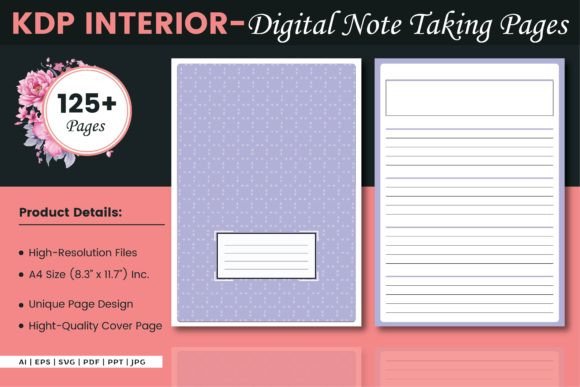
Paper quality and layout details also matter. Some people prefer dotted or grid backgrounds within the notes column to align diagrams; others want a clean plain area. If you’re printing your own pages, having access to well-designed templates makes a difference. Ready-made Cornell Note Taking Paper templates, like those designed for KDP interiors, often come with perfectly proportioned columns and a crisp finish that works for both pen and digital annotation. When you choose a thoughtfully crafted template, you skip the frustration of crooked lines and jump straight into productive note-taking.
How the Layout Influences Retention and Understanding
Why does such a simple sheet of paper change outcomes? Research on the testing effect and active recall tells part of the story. When you create cues and then cover the notes column to quiz yourself, you’re forcing the brain to retrieve information—a process that strengthens memory far more than rereading. The summary adds a layer of elaboration, another proven learning strategy. Together, these steps move information from short-term recognition to long-term knowledge.
In professional contexts, the value isn’t just memory; it’s clarity. A cue like “Options for reducing shipping costs” next to a dense list of logistics data makes decision-making faster. The summary, written in your own words, becomes a shared reference point for a team. This matters because clear communication around complex topics often determines whether a project moves forward or stalls in confusion.
Bringing Cornell Note Taking Paper into Your Current Workflow
You don’t need to overhaul your entire system overnight. Start with a single purpose—maybe turning your next client call notes into a Cornell page, or using the format for one textbook chapter. Pay attention to what changes. Many people find that the cue column gradually rewires how they listen: they start anticipating what might become a testable or actionable question. That shift improves focus even before pen touches paper.
Over time, you might customize the layout to fit your rhythm. Some extend the summary area for complex projects; others shrink the cue column when dealing with narrative-heavy material. The structure is a starting point, not a cage. And if you’re sourcing your paper, having a reliable set of templates that you can print on demand—whether for a binder, a discbound notebook, or a tablet—keeps the practice frictionless.
When Templates Make the Practice Smoother
Designing a page from scratch each time can drain enthusiasm. That’s why many people turn to pre-made Cornell Note Taking Paper designs. High-quality templates with precise margins, consistent line weights, and a balanced layout eliminate guesswork. You simply print and go, or import into a note-taking app. For creators and educators preparing materials for a class or a workshop, having an editable source file means you can add a logo, adjust the cue column width, or insert a heading without starting over. Whether you prefer A4-sized sheets with no bleed for printing or a digital file compatible with popular annotation apps, the right template turns good intentions into daily practice.
The fact that both students and senior executives rely on these same templates speaks to their versatility. In a world of endless productivity apps, a well-designed sheet of Cornell Note Taking Paper feels refreshingly grounded. It doesn’t send notifications. It doesn’t run out of battery. It just sits there, waiting to turn your scattered thoughts into something you can actually use later.