How A Safe Space KDP Interior 2 Streamlines Your Self-Publishing Workflow and Reduces Production Friction
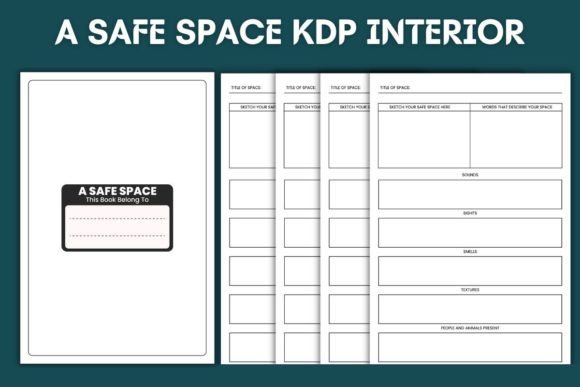
Self-publishers who have spent time formatting book interiors from scratch know exactly where the friction lives. Margins that shift during conversion. Fonts that render differently across platforms. Bleed settings that require trial-and-error adjustments before Amazon accepts the file. A Safe Space KDP Interior 2 exists to remove that entire cycle of frustration. It is a pre-formatted, print-ready interior template built specifically for Amazon KDP, designed so you can move from concept to upload without touching layout settings or second-guessing trim dimensions.
The product includes 120 pages of high-resolution interiors at 6 x 9 inches, one of the most commonly accepted trim sizes on the platform. Whether you are publishing a guided journal, a sketchbook, a workbook, or a reflective diary, the template provides a structured starting point that conforms to KDP's technical specifications from the moment you open the file.
Where A Safe Space KDP Interior 2 Fits in the Self-Publishing Lifecycle
Publishing a physical book on Amazon involves more than writing content. The production phase includes interior formatting, margin calibration, bleed configuration, and final file export at 300 DPI. These steps often create a bottleneck, especially for creators who are not graphic designers by trade. A Safe Space KDP Interior 2 sits at the critical handoff point between content creation and platform submission, eliminating the layout design phase entirely.
Instead of opening a blank document and building margins, gutters, and page templates manually, you start with a file that already mirrors KDP's requirements. This shifts your focus toward content population rather than technical setup. For someone managing multiple title releases, this change alone can compress production time by hours per project.
Pre-Publication Planning and Asset Preparation
Before you begin populating the interior, a few preparatory steps improve the final outcome. First, confirm your book's purpose aligns with the interior's structure. A Safe Space KDP Interior 2 is well-suited for creative journals, reflection notebooks, sketchbooks, and similar low-content or medium-content formats. If your project involves heavy text formatting, you may need to assess whether the template's page flow matches your manuscript length.
Second, organize any supplementary assets you plan to layer into the file. This might include illustrations, prompts, section dividers, or branded elements. Because the template comes in multiple formats, including PDF, JPEG, PNG, AI, and EPS, you can choose the version that best supports your editing workflow. Illustrator users will gravitate toward the AI files. Those working in Affinity Publisher or Canva may prefer importing the PDF or working from high-resolution PNGs.
Format Compatibility and Tool Integration
The inclusion of both raster and vector formats broadens the number of editing environments you can work within. Each format serves a distinct purpose, and understanding those distinctions helps you avoid unnecessary file conversion steps.
- PDF files are the most straightforward for direct upload to Amazon KDP. If no customization is needed, you can upload the PDF immediately after adding your content or leave it as a ready-to-print sketchbook.
- AI and EPS files provide full editability in Adobe Illustrator. These are ideal if you need to adjust layout elements, change color profiles, or integrate custom vector artwork into the interior pages.
- JPEG and PNG files offer page-by-page control in a wide range of software, including free tools like Canva, GIMP, or even Google Slides for basic publishing workflows.
This multi-format approach matters because self-publishers use vastly different software stacks. One creator might build everything in Adobe Creative Cloud. Another might operate entirely from an iPad using Procreate and Affinity. A Safe Space KDP Interior 2 accommodates both ends of that spectrum without forcing anyone into a specific tool ecosystem.
Working With Bleed and No-Bleed Configurations
KDP offers two submission paths: bleed and no-bleed. Choosing incorrectly can result in white edges on printed copies or content that gets trimmed during production. A Safe Space KDP Interior 2 provides both bleed and without-bleed versions, which means you can match your file to the exact specification your book requires. If your interior pages have artwork or color that extends to the edge of the page, select the bleed version. If your content stays within safe margins, the no-bleed file simplifies the process.
This dual-option approach is particularly valuable if you are testing different print formats or if you plan to release a paperback and hardcover version that may require different settings. Having both files ready prevents the need to rebuild margins later.
Practical Workflow: From Download to Live Listing
A typical implementation path moves through several checkpoints. Understanding these steps helps you integrate the template into your broader publishing calendar without disrupting other projects.
Start by downloading the complete file package. Open the format that matches your preferred editing software. If you are publishing a drawing journal with minimal text, you may not need to modify anything beyond adding a title page and copyright information. If you are creating a more structured workbook, you can duplicate pages, add text layers, and insert custom graphics while preserving the core layout's margin and spacing settings.
Before exporting your final file, verify that the resolution remains at 300 DPI. This is the standard KDP requires for crisp print output, and the template already meets that specification. However, if you add images or scanned artwork, confirm that those elements also meet the threshold. A common mistake is embedding web-resolution graphics into a print-ready file, which produces blurry results even when the base template is high quality.
After finalizing content, export your file as a PDF and run it through Amazon's Kindle Create tool or upload it directly to your KDP Bookshelf for preview. The online previewer will flag any margin or bleed inconsistencies. Because the template is pre-configured for KDP's trim size, these flags rarely appear, but running the check remains a sound quality control habit.
Quality Control and Long-Term Consistency
One of the less obvious advantages of working with a standardized interior template involves brand consistency across multiple titles. If you plan to release a series of journals, planners, or creative workbooks under the same brand identity, using A Safe Space KDP Interior 2 as your foundational layout ensures that each release shares identical trim dimensions, margin spacing, and page count logic. Customers who purchase multiple titles from your catalog will experience visual and tactile consistency, which supports brand recognition and reduces returns related to formatting complaints.
Quality control also benefits from the template's pre-tested structure. Amazon's print-on-demand machinery processes thousands of files daily, and files that deviate from technical specs often trigger manual reviews or production delays. A pre-formatted interior that already aligns with KDP's backend requirements passes through the ingestion system more reliably than a custom-built file created by someone unfamiliar with print specifications.
Managing File Organization Across Projects
Self-publishers often juggle multiple titles in different stages of completion. Without a clear file organization system, locating the correct template version weeks after downloading it can waste time. One practical approach is to create a master folder for each KDP project and store the relevant format files alongside your manuscript, cover design, and metadata documents.
Since the product includes 100 files ready for upload, you might also consider creating a "template library" on your local drive or cloud storage. When a new project idea surfaces, you can pull from the library rather than searching through past purchases or rebuilding interiors. For creators who publish frequently, this small upfront organization step compounds into significant time savings over a year.
Use Cases Across Different Creator Profiles
A Safe Space KDP Interior 2 is not limited to a single genre or creator type. Its structure supports a range of publishing goals, and how you implement it depends on your specific output.
For journal and notebook publishers: The interior functions as a near-complete product. Add a cover design through KDP's Cover Creator or a custom-designed cover file, and you have a sellable physical product within hours. The 120-page count provides enough volume for a substantial feel while keeping print costs manageable for competitive pricing.
For coaches and educators: The template can serve as the interior for client workbooks, reflection journals, or course companion notebooks. Because you can edit the AI and EPS files, you can insert prompts, exercises, and instructional content while keeping the overall layout clean and professional.
For artists and illustrators: The 6 x 9 trim size and high-resolution pages provide a consistent canvas for sketchbook publishing. Artists can publish collections of line art, prompts, or blank sketchbooks under their brand, using the template as the structural backbone.
For marketers and content creators: Branded journals and notebooks have become popular lead magnets and merchandise items. The template accelerates the production of these physical products without requiring design outsourcing.
Integration With the Broader KDP Ecosystem
A Safe Space KDP Interior 2 does not operate in isolation. It interacts with several other components of the publishing workflow, including cover design, metadata setup, pricing strategy, and category selection. The interior's trim size and page count directly influence your cover template dimensions and spine width calculation, which Amazon generates automatically based on the interior file you upload.
When you input a 6 x 9 trim and 120 pages into KDP's cover calculator, the platform produces a correctly sized cover template. If your interior file contains accurate bleed settings, the cover wrap calculation will also be precise. This interconnectedness means that starting with a technically sound interior file reduces errors downstream in the cover design phase.
Additionally, the page count affects printing cost, which shapes your royalty calculations. A 120-page black-and-white interior printed through KDP carries a known production cost, allowing you to model pricing scenarios before committing to publication. For publishers operating on thin margins, this predictability supports better financial planning.
Common Implementation Pitfalls and How to Avoid Them
Even with a ready-to-upload template, certain mistakes can surface. The most frequent one involves adding content that pushes beyond the safe margin area. The template's margins are set to KDP's specifications, but if you manually extend text boxes or images beyond those boundaries, you reintroduce the risk of trimmed content. Keep all critical elements within the established margins, especially on the bleed version where edge-to-edge artwork must intentionally extend past the trim line to achieve the full-bleed effect.
Another pitfall is forgetting to flatten layers or embed fonts when exporting from editing software. If you use the AI file and add custom text with fonts not installed on KDP's processing system, substitutions may occur. Convert text to outlines before export or use fonts that are universally available or embedded within the PDF.
Finally, always order a proof copy before making your listing live. The digital previewer catches many issues, but physical copies reveal subtle details such as paper texture, ink density, and actual margin feel. A proof order costs a few dollars and ships within days, providing a final quality gate before customers receive your product.
Long-Term Value for a Growing Publishing Catalog
The value of a pre-formatted interior template becomes more apparent as your catalog expands. What begins as a single journal release can evolve into a series of complementary products, each built from the same underlying file structure. The time invested in learning the template's specifications once pays dividends across every future title that shares the same trim size and layout logic.
For self-publishers who treat their KDP activity as a business rather than a one-off project, this kind of standardized asset belongs in the toolkit alongside cover templates, keyword research spreadsheets, and category analysis resources. It removes a recurring technical task from the production cycle and lets you allocate creative energy toward content that differentiates your titles in a competitive marketplace.